@frankietreasure5
Wait until your baby starts dancing, 20.4M views
CapCut AI baby dance
One photo in, the CapCut baby-template dance out — without opening CapCut.
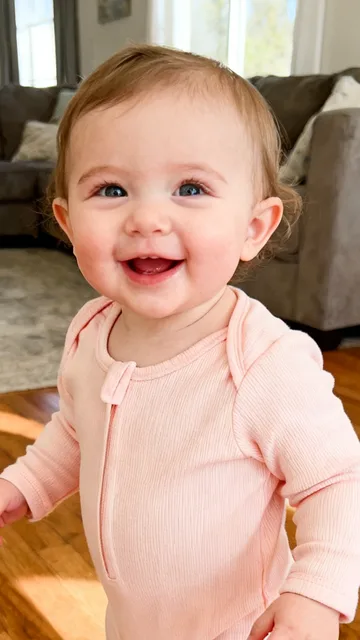
A 10-second vertical dance video, usually 5–8 minutes. The video has no music: add the Bonito Bonito sound when you post on TikTok. Upload only a photo you have the right to use. Failed steps are refunded.
Bonito bonito AI baby is the CapCut template people search when they want a baby photo to start dancing: the on-screen prompt says "Wait until your baby starts dancing", then a close-up AI baby hits the Bonito Bonito gestures on the beat. On October 24 that pioneer post by @frankietreasure5 passed 20 million views; the 44 posts we track now total 26.4 million. Here you skip CapCut: upload one photo and download a 10-second vertical dance. Add the Bonito Bonito sound in TikTok when you post.
Examples from TikTok
Three real CapCut baby-template posts. Not made with ReelMuse.
Clips belong to their creators and link back to TikTok. The bonito bonito AI baby page above makes the dance from your own photo.
The CapCut “Wait until your baby starts dancing” template lit up on October 24, 2026. In one week the posts we track jumped from 0 the week before to 43, with 26.4 million combined views. @frankietreasure5’s pioneer clip alone holds 20.4 million — about 77% of the tracked total.
The hook is the freeze-then-dance gag: you stare at a still baby, then the AI starts the cheek taps and shoulder wiggles on the Bonito Bonito beat. Parents share it as a cute flex; commenters argue whether it is real. That mix of cuteness and “is this AI?” keeps the template spreading.
TikTok numbers from public posts, as of November 2, 2026.
It is a CapCut AI pioneer template, not a hand-filmed dance challenge. You pick a baby photo, tap “Make the same video”, and CapCut returns a close-up of that baby doing the song’s gestures — often with the English caption “Wait until your baby starts dancing…”. Hashtags on the top posts include #capcutpioneer, #aibaby and #dance.
This page remakes that template dance without the app. The moves come from our own reference clip (performed by a fictional baby), and your photo takes its place. For the song-and-gesture story under the “un cafecito riquito” name, see the un cafecito riquito AI page — same dance family, different search angle.
CapCut’s pioneer templates let creators publish an AI effect other people can rerun with one tap. The bonito bonito AI baby template is one of those: a fixed baby-dance motion, the Bonito Bonito / Un Cafecito Riquito sound, and a caption that dares you to wait for the still frame to start moving.
Thiago Navarro’s track supplies the beat and the Spanish diminutives people already know from lyric videos. The template’s job is the face: keep the baby’s look, swap in the dance. That is why a single pioneer post can pass 20 million views in days — anyone with a baby photo can remake it in CapCut, and now here without CapCut.
Most comments gush over how cute the baby looks; a loud minority insists it is AI:
“Que lindo este veve 🥰 amo a ese niño como a esa música”
122,707 likes. Spanish for “how cute this baby — I love that child and that song.”
“Me preocupa la gente q piensa q esto es real”
55,738 likes. “I’m worried about people who think this is real.”
“Que bendición, es un regalo de Dios, cuando crezca será súper bailarín.”
28,493 likes. “What a blessing, a gift from God — he’ll be a great dancer when he grows up.”
“me lo mandó mi mamá que quiere un nieto que baile así dice”
7,066 likes. “My mom sent this to me saying she wants a grandson who dances like that.”
Step 1
A baby, a kid or yourself, one person facing the camera. Waist-up photos match the CapCut close-ups best; only use a photo you have the right to use.
Step 2
Press Create (100 credits). In about 5–8 minutes the person in your photo does the Bonito Bonito baby-template moves: cheeks, wiggles and waves.
Step 3
Download the 10-second vertical video and add the Bonito Bonito sound in TikTok before you post.
Both turn a photo into the Bonito Bonito baby dance. ReelMuse is not affiliated with CapCut or ByteDance.
ReelMuse
CapCut template
What you upload
One photo.
A photo, then you edit inside the CapCut template.
Who dances
Your baby, your kid or you.
Whoever the CapCut template supports.
Video
A 10-second vertical dance video to download.
The template’s clip, exported from the app.
Music
Add Bonito Bonito in TikTok when you post.
Comes with the template.
Price
100 credits, shown before you create.
Depends on the app and template.
Looking for the song-first angle? Open un cafecito riquito AI. For a longer baby dance, try baby dance AI, or add a mustache with baby mustache AI.
ReelMuse makes the dance video from the photo you upload. The photo is used for that video. Read the privacy policy and the terms.
It is the CapCut AI template titled “Wait until your baby starts dancing”: upload a baby photo and the app makes a close-up of that baby doing the Bonito Bonito hand gestures. The wave took off on October 24, 2026; the top post alone passed 20 million views.
Same CapCut baby-dance template and the same Thiago Navarro song, searched under two names. This page is written for the CapCut baby-template angle; the un cafecito riquito AI page covers the song’s hand-gesture trend. They link to each other so you can pick the name you searched for.
Upload one photo on this page and press Create. You get a 10-second vertical dance video. Then open TikTok, add the Bonito Bonito sound, and post.
Yes. Any photo of one person works. Use a waist-up shot facing the camera; group photos and pets do not work well.
The song belongs to its owners, and TikTok lets you add it for free inside the app. Adding the sound there also puts your video on the sound’s page.
No. ReelMuse is not affiliated with CapCut or ByteDance. This page remakes the same kind of baby dance from your photo with its own AI dance, no app needed.
100 credits for one 10-second dance video. The price is on the button before you create, and if the video fails the credits go back to your account automatically.