ReelMuse creator tools · Free beta
MiniMax M3.1 Flash Online
An idea. A screenshot. A working project.
Turn a description or screenshot into an interactive page with HTML, CSS and JavaScript. Run it, refine it in plain language, and download the result—all here in ReelMuse.
A landing page, a tiny game, a dashboard. Add a screenshot to guide the design.
PNG, JPEG or WebP · up to 5 MiB / 16 MP
Free beta · No credits charged. 5 successful results / 10 attempts per account per UTC day; 100 shared attempts. Prompts, images and refinement HTML are sent to MiniMax. Results are cached for 24 hours for retries. Avoid sensitive material.
Make something you can use.
Start with an idea or reference. Get a complete HTML project, run it here, then make it yours.
Preview runs locally in an isolated frame. External resources and fetch/API requests are restricted. Only run code you trust; do not enter secrets. Generated code may contain mistakes; review before publishing.
Analyze with M3.1 Flash
Free beta · No credits charged · 5 successful analyses and 10 attempts per account per UTC day. Shared service limit: 100 attempts per day.
01 / Describe
Start with a screenshot or an idea. Ask for specific interactions, layout and visual details.
02 / Run & refine
Inspect the code, run the isolated preview, and describe what should change.
03 / Take it with you
Download a single HTML file with its styles and scripts. Review it before publishing.
Saved model result · Not a live generation
From reference to something interactive
We sent this self-authored reference to MiniMax M3.1 Flash. The saved response below is the actual model output, generated in 21.9 seconds in one request. This single run is not a speed benchmark. The prompt shown is shortened for readability.
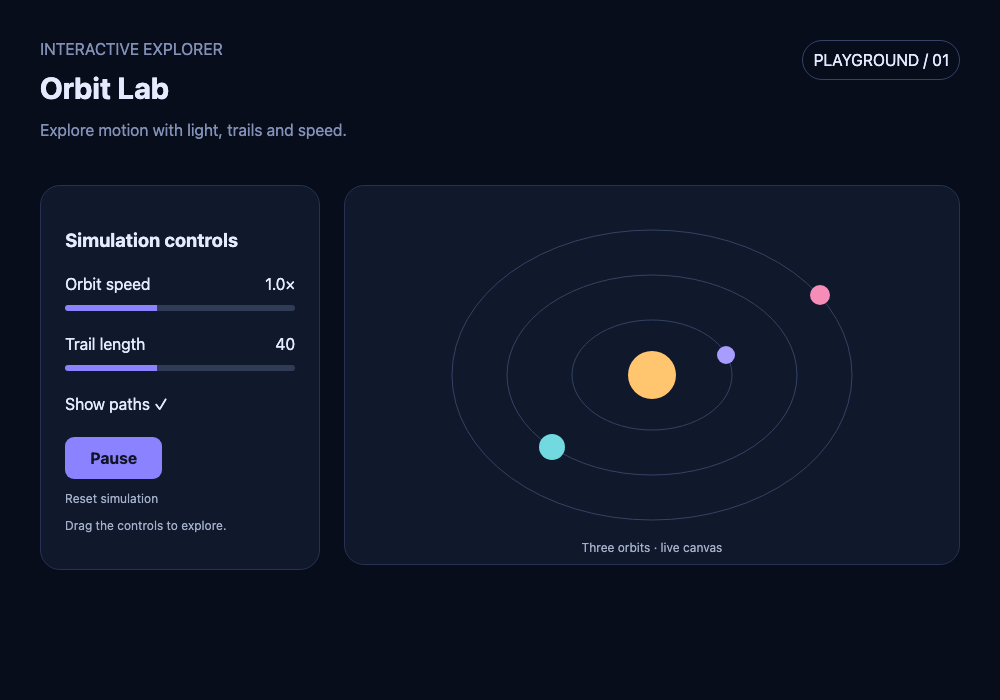
Prompt: Recreate this Orbit Lab interface as an interactive orbital simulation with animated planets, speed and trail controls, pause and reset.
Then we asked for a 3 / 5 planet selector. The saved refinement adds it while keeping the existing controls. That request took 30.9 seconds; timings are individual examples, not benchmarks.
Run an actual saved HTML response in an isolated preview.
Beyond this workbench · Official MiniMax examples
What M3.1 Flash can help build
MiniMax presents M3.1 Flash for agent coding and Computer Use. It reports nearly 3× the speed and 70% lower cost than its predecessor. These are MiniMax’s claims, not ReelMuse benchmarks.
Reference photos → 3D architecture
An interactive Three.js scene built from architectural reference images.
Interactive fluid simulation
A visual simulation with controls for exploring fluid behavior.
Code performance profiling
Inspecting code to identify performance bottlenecks.
Financial workbooks
Building spreadsheet-based financial analyses.
Those are official agent examples. This ReelMuse tool creates and refines one self-contained HTML file; it does not operate your computer or run a full autonomous agent.
Model announcement ↗See the official examples ↗Text, image & video input API ↗
Also available: image & video analysis — see a real example
Actual model example · October 25, 2026
A six-second reference, a real analysis
We made this simple geometric car clip and sent it to MiniMax M3.1 Flash. The response below is the actual returned text, not a staged answer or generated video.
Self-authored input · 640 × 360 · 6 seconds · no audio
What we checked: the car, windows, wheels, road and sun are described accurately. Fade timing is off by about a second. Treat the shot list as an editable draft, not a frame-accurate timeline.
Unedited model response
### Visible shot list
- **0:00–0:01:** Black frame; the scene appears by about 0:01, but the sampled frames do not establish whether this is a cut or fade-in.
- **0:01–0:04:** Static, flat 2D side view. A red car with two white windows and black wheels sits in the lower-left on a dark gray road. The background is a pale blue sky with a yellow square sun in the upper-right.
- **0:04–0:05:** The entire scene gradually darkens in a visible fade-out.
- **0:05–0:06:** Black.

No object movement, camera movement, or other animation is visible; the apparent change at the end is a fade rather than motion.

### Recreation prompt
Create a 6-second, 640×360 minimalist 2D animation: begin on black, reveal a perfectly static side-on scene with a flat pale-blue sky, a dark-gray horizontal road covering the lower portion, a simple red car with two white rectangular windows and two black wheels positioned in the lower-left, and a plain yellow square sun in the upper-right. Hold the composition without movement for roughly four seconds, then fade the entire scene smoothly to black and hold black through the end. Use simple geometric shapes, solid colors, and a locked camera.
Model: MiniMax-M3.1-Flash · Reported usage: 1,627 tokens. This is one example, not a performance benchmark.
From reference to storyboard
- Upload a short clip you have permission to share, or start with text only.
- Ask for visible shots, subjects, camera framing and a recreation prompt.
- Review timestamps and remove unsupported guesses. Keep character descriptions consistent across shots.
- To create a new clip, take your edited prompt to ReelMuse text-to-video. Generation is a separate step with its own models and pricing.
Frequently asked questions
Where can I use MiniMax M3.1 Flash online?
Sign in and describe a project, optionally with a screenshot. Build a single HTML file with CSS and JavaScript, run the preview, request changes and download it. The secondary Analyze media tab accepts images and short videos. No personal API key is needed.
How do I turn a video into a shot list or storyboard?
Upload an MP4 or MOV and ask for visible subjects, framing, camera movement and approximate shot timestamps. Ask for a separate storyboard or recreation prompt. Check the output against the clip: video is sampled at one frame per second, so short cuts and exact timings may be missed.
Is M3.1 Flash the same as Hailuo? Does it generate video?
No. This M3.1 Flash tool understands text and visual references and returns text. Hailuo is a video-generation product. Use the analysis as a draft for a separate video tool; it does not create a finished video here.
Is the ReelMuse beta free?
Yes, no ReelMuse credits are charged in this beta. Each signed-in account can complete up to 5 successful results and make up to 10 attempts per UTC day. A shared limit of 100 attempts per day also applies, so access is not guaranteed.
Can it analyze audio or give exact timestamps?
This tool does not analyze audio. Video frames are sampled at one frame per second, and timestamps are approximate. Do not rely on it for frame-accurate editing, dialogue transcription or details that appear briefly.
What happens to my uploaded material?
Your prompt and reference material are sent to MiniMax for processing. Results are cached for 24 hours to support retries. Only submit content you have permission to share, and avoid sensitive personal information.