How to Make a Tiny Desk AI Video (Put Your Friends in the Band)
The Tiny Desk AI trend puts your face, and up to four friends, into the viral Tiny Desk concert clip. Here is how to make one on ReelMuse, which photos to use, and why some videos miss people in the group shots.
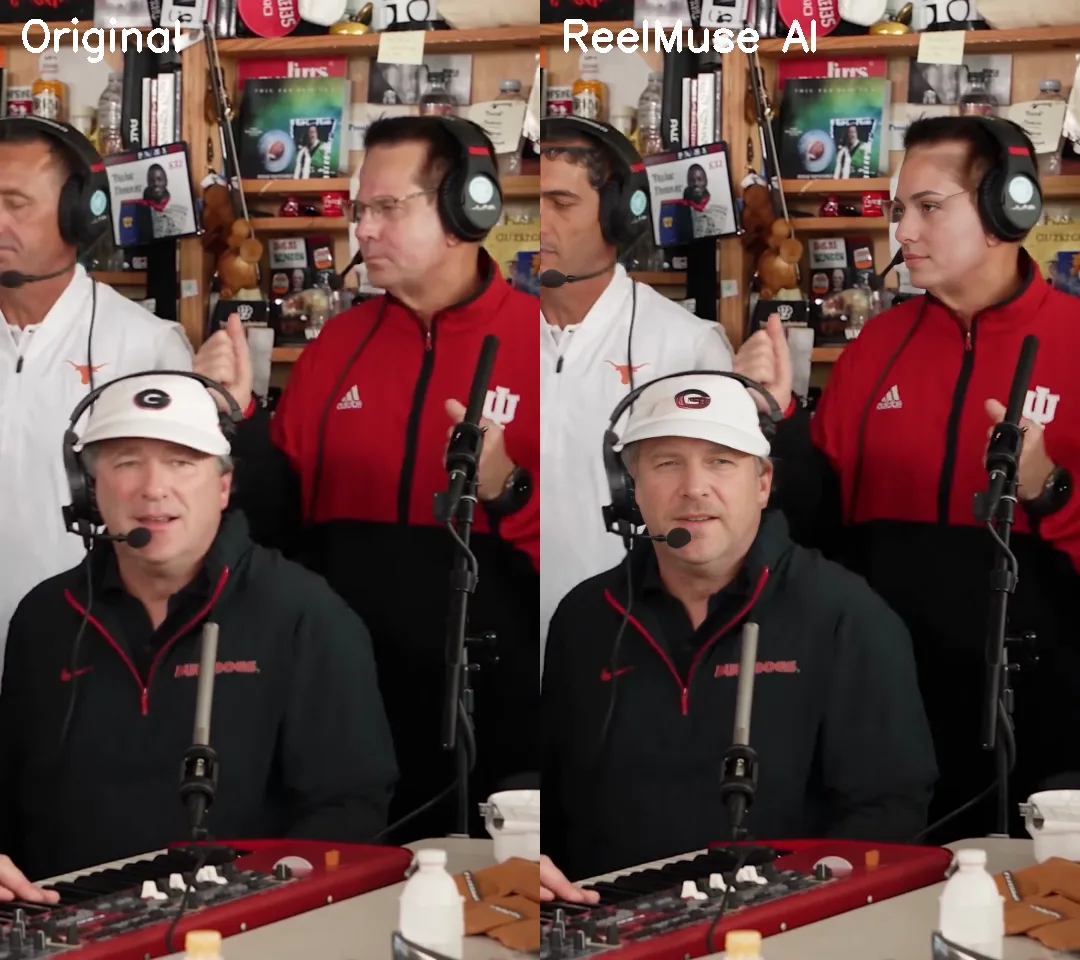
Short answer: a Tiny Desk AI video takes the 19-second viral Tiny Desk performance clip and recasts the band with your photos. On ReelMuse Tiny Desk AI you upload one photo for the lead singer and up to four more for the left singer, keys player, right singer and sax player. Every seat you fill gets that person's face in every shot they appear in, and every empty seat keeps the original performer. The music, camera moves and timing stay exactly as in the original clip.
A ReelMuse sample with five different test faces, one per seat.
What is the Tiny Desk AI trend?
In October 2026 a short Tiny Desk-style performance clip, a singer in a red cap laughing between lines while a small band plays behind a desk, became a TikTok template. People recast it with themselves, friends, coworkers or a whole sports team. The joke works because the clip has five clear roles, so a group of friends can each "join the band".
How to make one on ReelMuse (step by step)
- Open the generator. Go to reelmuse.ai/tiny-desk-ai and sign in.
- Upload the Lead photo. This is the only required seat. The lead appears in the side close-up and the laughing close-up.
- Fill any of the four optional seats. Left (standing, white shirt), Keys (seated in front, white cap), Right (standing, red jacket) and Sax (the saxophone close-up). Use a different person for each seat.
- Press Create. One video costs 1,000 credits. If you do not have a plan, you can buy a one-time 1,000-credit pack without subscribing.
- Download the MP4. You get a 19-second vertical video with the original audio, ready for TikTok, Reels or Shorts. You also get an email when it is ready.
Which photos work best
- One person per photo, face clearly visible and looking roughly at the camera.
- Good light, no sunglasses, no heavy filters. Hats are fine, but the face must be uncovered.
- Head-and-shoulders or waist-up is ideal. Tiny faces in a group photo give weaker results.
- Only upload photos of people who agreed to it. The account holder must be 18 or older.
Why some Tiny Desk AI videos miss people
The hard part of this trend is the group shot. In the wide shots three band members are on screen at once and their faces are small, so AI models can swap one or two people and leave the third as the original performer. Close-ups are much easier: there is one large face per shot.
What helps the most is the photo you upload:
- Pick the right seat. Left, Keys and Right only appear in the wide shots, so give them the clearest, most front-facing photos you have.
- Use different-looking people for different seats. Clearly different faces are easier to keep apart.
- Check the result. If a seat you filled still shows the original performer, contact support with the task ID.
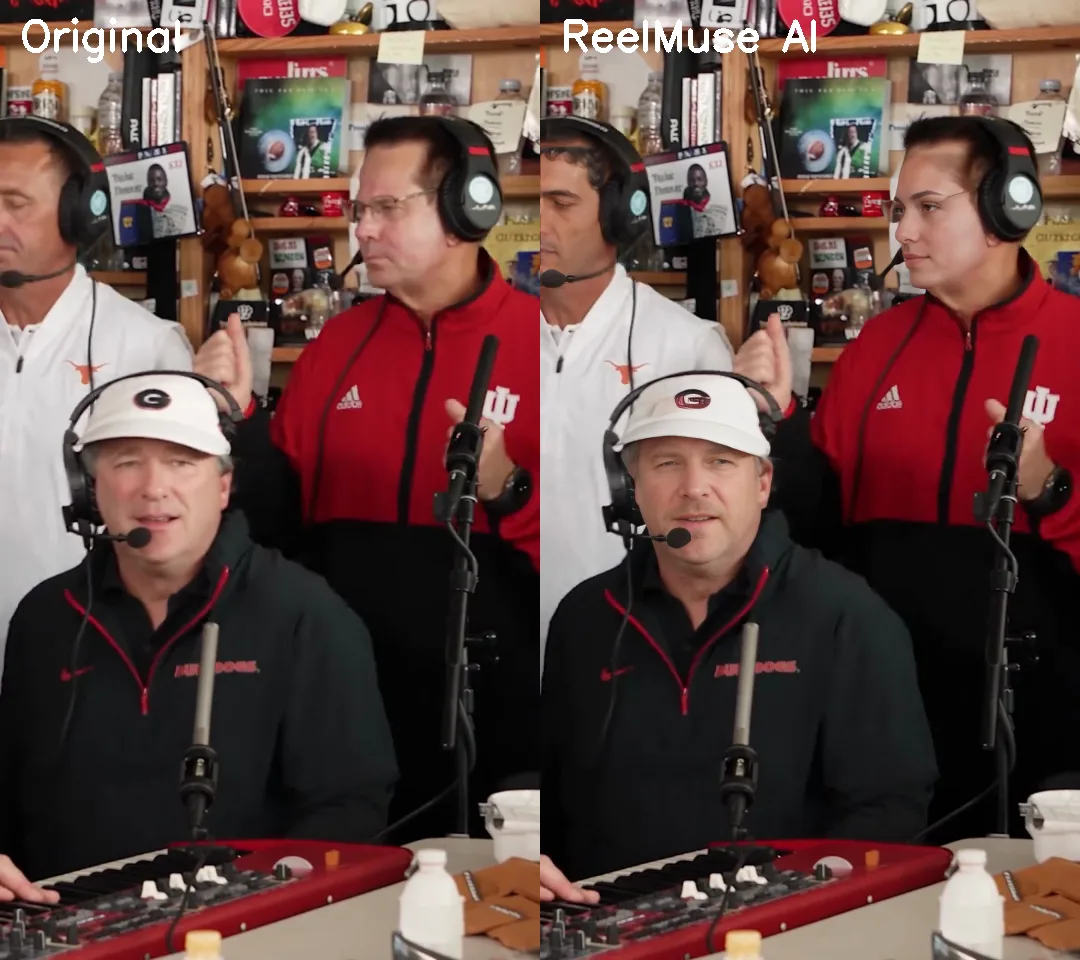
Group shot at 4 seconds: original (left) and a ReelMuse sample with the Left, Keys and Right seats filled (right).
ReelMuse vs. editing apps vs. text-to-video
| ReelMuse Tiny Desk AI | Editing app template | Text-to-video AI | |
|---|---|---|---|
| What you do | Upload 1–5 photos, press Create | Find the template, cut and mask by hand | Write prompts and retry |
| Multiple people | Up to 5, each in every shot they appear in | Usually one face sticker | Hit or miss |
| Original timing and audio | Kept | Kept | Usually a new scene |
| Cost shown up front | Yes, 1,000 credits | Depends on the app | Depends on the app |
Ready to try it? Make your Tiny Desk AI video.
FAQ
What is Tiny Desk AI?
Tiny Desk AI is a TikTok trend where people use AI to put their own face, and their friends' faces, into a viral 19-second Tiny Desk concert clip. ReelMuse lets you fill up to five seats: Lead, Left, Keys, Right and Sax.
How many people can I put in the Tiny Desk AI video?
Up to five. The Lead photo is required; the Left, Keys, Right and Sax seats are optional. Every seat you fill is replaced in every shot that person appears in, and empty seats keep the original performer.
How much does a Tiny Desk AI video cost on ReelMuse?
One video costs 1,000 credits. You can buy a one-time 1,000-credit pack without a subscription. Failed videos are refunded.
How long does it take?
Usually 15 to 30 minutes. You can leave the page; the video appears in your tasks and you get an email when it is ready.
Why is one of my friends unchanged in the group shot?
Faces in the wide group shots are small, so AI models sometimes miss one. Use a clear, front-facing photo for the Left, Keys and Right seats, and contact support with your task ID if a filled seat still shows the original performer.
Is the original music kept?
Yes. The output keeps the original audio, timing and camera cuts of the clip.